Clamp-On Desk Lamps: Saving Space on Your Desk
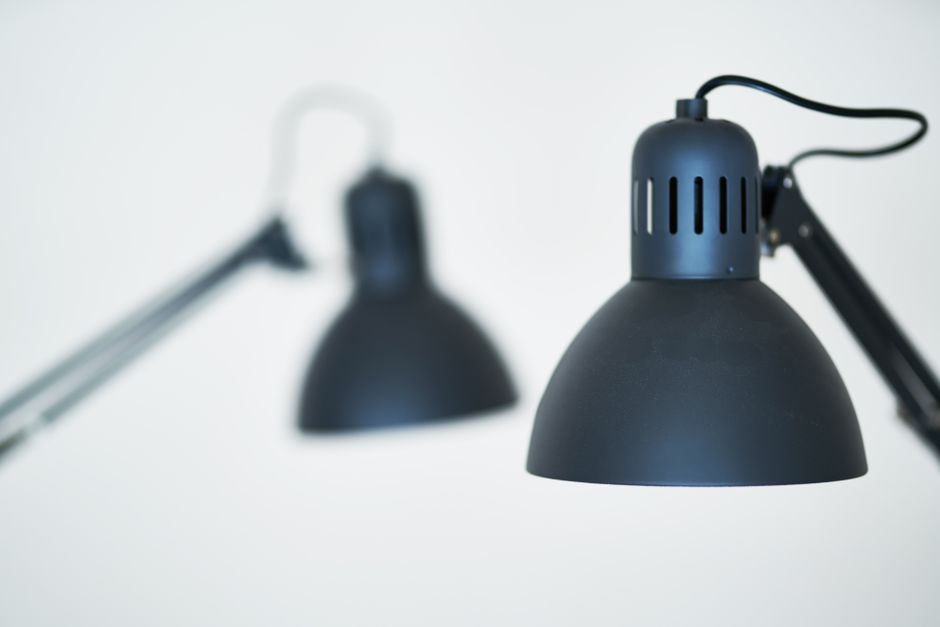
Modern work environments often require efficient use of limited desk space. For those who share a home office, work from a compact nook, or simply prefer a clutter-free surface, every square inch matters. Traditional desk lamps with wide bases can occupy a significant portion of the working area, potentially interfering with monitors, notebooks, or other essential items. Clamp-on desk lamps offer an alternative design that addresses this challenge by attaching directly to the edge of a desk or table, leaving the surface unobstructed.
The basic principle behind a clamp-on lamp is straightforward: instead of resting on a base, the fixture features a mechanism that grips the edge of a horizontal surface. This approach not only frees up the desk itself but also allows for greater flexibility in positioning the light source. Because the lamp is secured to the desk edge, it can be placed precisely where illumination is needed without the risk of being knocked over. For individuals working in tight spaces, such as dorm rooms, cubicles, or small apartment desks, this design can be particularly practical.
Understanding how clamp-on lamps function, what to consider when choosing one, and how to integrate them into a workspace can help individuals make an informed decision. This article explores the key aspects of clamp-on desk lamps, focusing on their attachment mechanisms, compatibility with different desk types, and the factors that influence their effectiveness in various work settings.
How Clamp-On Lamps Attach to Desk Edges
The attachment mechanism is the defining feature of a clamp-on lamp. Most designs use a C-shaped clamp that fits over the edge of the desk, with a screw or lever that tightens to secure the lamp in place. The clamp is typically padded with rubber or silicone to protect the desk surface and provide grip. Depending on the model, the clamp may accommodate a range of edge thicknesses—commonly from about half an inch to two inches or more. Some lamps offer adjustable jaws that can be rotated or repositioned to fit angled edges or rounded corners.
Beyond the basic clamp, many lamps include a pivoting joint at the base of the arm, allowing the user to rotate the lamp horizontally even after it is clamped. This feature is useful when the desk is positioned against a wall, as it enables the light to be directed across the workspace without having to move the entire fixture. The arm itself may be articulated with one or more adjustable segments, making it possible to change the height and angle of the light head. These adjustments rely on friction hinges or locking knobs, which should be evaluated for durability and ease of use.
For desks with unusual profiles—such as glass tops, rounded edges, or very thick surfaces—it is important to verify the clamp’s compatibility. Some manufacturers provide specific measurements or recommend maximum thicknesses. Additionally, the clamp should be tightened firmly enough to prevent the lamp from slipping, but not so forcefully that it damages the desk edge. Over time, the padding may compress, requiring occasional readjustment.
Considerations for Desk Material and Clamp Compatibility
The material and construction of the desk play a significant role in how well a clamp-on lamp performs. Solid wood, laminate, and metal desks generally provide a firm edge that the clamp can grip securely. For desks with a hollow core or thin particleboard, excessive clamping pressure could potentially cause indentation or cracking. In such cases, using a small protective pad between the clamp and the desk may help distribute the pressure more evenly.
Glass desks require extra caution. The clamp must have adequate rubber padding to avoid scratching the surface, and the glass should be thick enough to withstand the clamping force without risk of fracture. Most clamp-on lamps are not designed for glass surfaces unless the manufacturer explicitly states compatibility. Similarly, adjustable-height desks with moving mechanisms often have edges that are not perfectly straight or that contain gaps where the clamp could catch. A lamp that must be repositioned frequently may not be ideal for such desks.
Another factor is the presence of a grommet hole or cable management channel near the desk edge. Some clamps are designed with a cutout or slot to accommodate cords, while others may block access to these features. Checking the lamp’s base design against the desk layout can prevent interference with existing cable routing. For desks with a metal frame that protrudes near the edge, the clamp may need to be positioned away from the frame to achieve a flush fit.
Positioning and Light Direction for Task Lighting
Once the lamp is securely attached, the next consideration is how to direct the light for optimal task illumination. Clamp-on lamps often feature adjustable heads that can tilt, swivel, or rotate. Some models include a long gooseneck arm that can be bent into various shapes, while others use hinged segments that lock into place. The ability to position the light source directly over the work area—without shadows cast by the user’s hands or equipment—is a key advantage of this design.
The height of the lamp head relative to the work surface influences the spread and intensity of light. Raising the head casts a wider pool of light but reduces brightness per unit area; lowering it creates a more concentrated beam. Many modern clamp-on lamps use LED bulbs that emit a directional light, so the angle of the head can be critical. When the lamp is mounted on the left or right side of the desk, the light should be directed to fall across the work area from the side to minimize glare on screens.
Task lighting standards, such as those from the Illuminating Engineering Society, suggest that for reading or detailed work, the light should come from the side opposite the dominant hand to reduce shadows. For computer work, indirect ambient lighting is often preferred to avoid screen reflections. Clamp-on lamps with adjustable brightness or color temperature settings may offer additional flexibility for different tasks, but such features depend on the specific model.
Electrical and Safety Aspects
Because clamp-on lamps are frequently moved or repositioned, their electrical components must be designed for durability. The power cord should be long enough to reach an outlet without stretching, and it should be routed in a way that does not create a tripping hazard. Some lamps include a cord clip or a groove in the clamp to guide the cable along the desk edge. For desks placed against a wall, a cord that exits the lamp downward and then runs along the back corner can be less intrusive.
The weight of the lamp is another safety factor. A heavy fixture may exert torque on the clamp, potentially causing it to loosen over time. Manufacturers typically specify a maximum overhang or weight limit for their clamps. If the lamp is mounted on a thin or lightly built desk, it might be advisable to check the clamp’s grip periodically. Additionally, LED bulbs, which are common in modern clamp-on lamps, generate less heat than incandescent bulbs, reducing the risk of burns or heat damage to nearby objects.
For workstations that include multiple electronic devices, the total electrical load on a single outlet should be considered. Many clamp-on lamps operate on low wattage, making them suitable for daisy-chaining with other devices, but power strips with surge protection are still recommended. If the lamp has a built-in USB port for charging, it should meet standard safety certifications.
Comparing Clamp-On Lamps to Other Desk Lighting Options
Clamp-on lamps are not the only space-saving lighting solution, and understanding their trade-offs relative to other types can guide selection. Freestanding desk lamps with a weighted base are more portable and can be placed anywhere on the surface, but they occupy usable area. Under-monitor light bars attach to the top edge of a monitor, providing focused illumination without taking desk space, but they are limited to setups where a monitor is present and the light bar’s reach is sufficient.
Floor lamps with articulated arms can also be used to light a desk without taking surface area, but they require floor space and may not provide the same directional control. Clamp-on lamps strike a balance between the two: they free the desk surface while remaining close to the work area, offering fine-tuned positioning. However, they are limited by the desk edge geometry and cannot be easily relocated to another room without unclamping.
In collaborative workspaces or shared desks, a clamp-on lamp might be considered less flexible because it is fixed to one location. In a home office where the desk is permanent, the stability and space savings can be more valuable. The choice ultimately depends on the specific layout, the user’s tasks, and the degree of adjustability required.
Choosing the Right Clamp-On Lamp for Your Workspace
Selecting a clamp-on lamp involves evaluating several practical factors. The size of the clamp should be matched to the desk edge thickness, and the lamp’s reach should be sufficient to cover the main work area. The brightness level, measured in lumens, and the color temperature, measured in Kelvin, influence how the light interacts with the environment. For example, a lower color temperature (around 2700K) produces a warm, yellowish light, while a higher temperature (5000K) yields a cooler, bluish-white light that may be more suitable for detailed tasks.
Durability of the clamp mechanism and joints is another consideration. Metal components tend to last longer than plastic, but they may add weight. The ease of adjusting the lamp without tools—using hand-tightened knobs or friction hinges—can affect daily use. Some models offer memory settings or integrated dimmers that allow the user to maintain consistent lighting conditions across sessions.
For those who work in a shared or multi-purpose room, a lamp with a cord cut-off switch or a timer could provide additional convenience. It is also worth checking whether replacement parts or bulbs (if not integrated LEDs) are readily available. By weighing these aspects against the specific demands of the workspace, an individual can identify a clamp-on lamp that fits their needs without over-promising performance outcomes.